Input images
Input images are the images passed to the embedding model. A variety of constructors are available to generate input images.
Image size
Every constructor emits a square RGB image whose side is the embedding model's input size (or --resize, if set):
| Model | Input size |
|---|---|
dinov3_convnext_base |
224 |
dinov3_vit |
224 |
Constructors
| Constructor | Example |
|---|---|
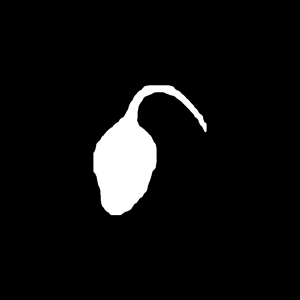
silhouette_centered · Silhouette (cropped, true scale)Cropped white silhouette, centered at true scale in the shared canvas. Steps: crop_to_bbox → init_binary_mask → center_in_square → resizeMask: uses the subject mask |
 |
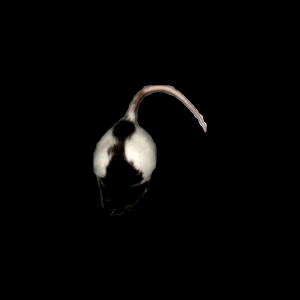
masked_color_centered · Color (cropped, true scale)Cropped full-color animal (pixels under the mask), centered at true scale. Steps: crop_to_bbox → apply_mask → center_in_square → resizeMask: uses the subject mask |
 |
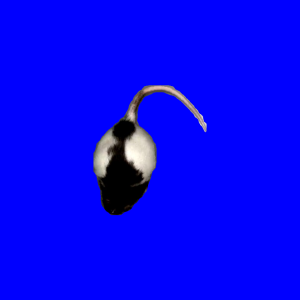
masked_color_centered_contrast (default) · Color on max-contrast bg (cropped, true scale)masked_color_centered on the mathematically max-contrast background for this animal. bg_color ([R, G, B]) is the in-gamut color that maximizes CIELAB distance from the animal's mean masked-pixel color, computed once per run from the data. It fills both the masked-out region and the canvas padding, so the subject sits on the single most separable solid background its own coloring allows. For a dark animal this resolves to blue.Steps: crop_to_bbox → apply_mask → center_in_square → resizeMask: uses the subject mask |
 |
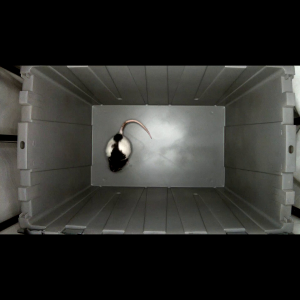
full_frame · Full frame (no mask)The whole decoded frame, with no localization and no mask (the scene baseline). Steps: init_frame → pad_to_square → resizeMask: no mask (keeps the background) |
 |